Level Manager System
Category: Level Architecture, Initialization, and Scene Control
Context: This document covers the level-specific management layer used in Data Division. The focus here is the LevelManager, its LevelData ScriptableObject, and the map/venue selection flow that depended on that data. This intentionally leaves TimeManager and CameraStateManager out of scope.
What The System Was For
Each Unity scene was meant to carry its own LevelManager.
Unlike the broader GameManager, this manager was not a singleton. The point was to let each level own its own configuration, state, and setup behavior while still pulling from shared groundwork systems.
That mattered because the project had multiple kinds of playable spaces:
- the Neighborhood home-base scene
- company / infiltration spaces
- drone-specific spaces
- levels with different control rules, collectables, and exit logic
The LevelManager was the layer that turned those spaces into configurable venues instead of hard-coded one-offs.
Scene Placement and Relationship To The Map
At the scene level, the level manager sat alongside the other managers, while the map UI and venue selection logic depended on the same underlying LevelData.
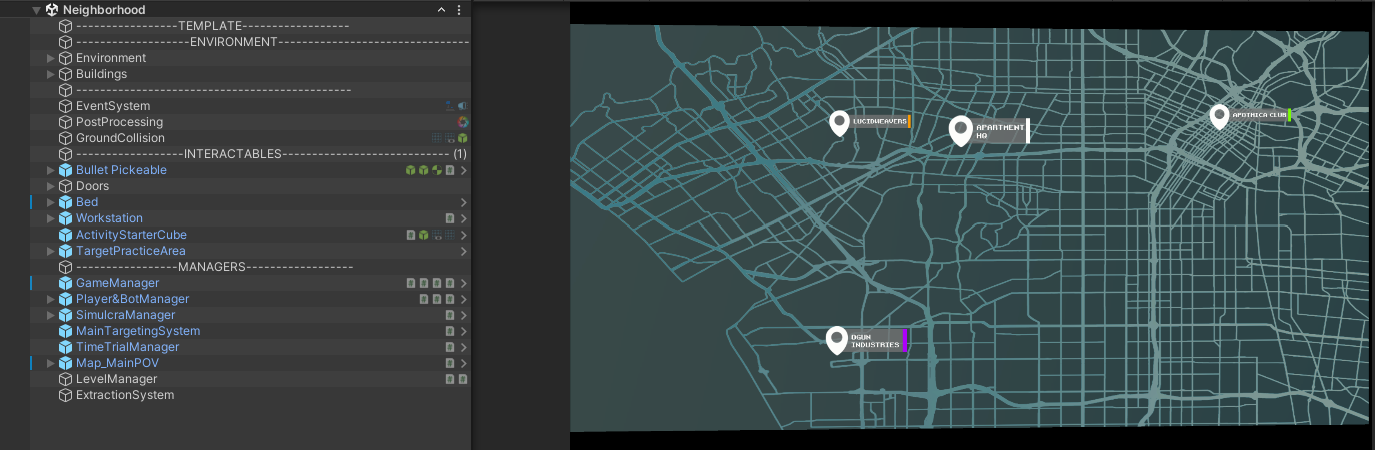
This image is useful because it shows the real architectural relationship:
LevelManagerexists in the scene with the other managersMap_MainPOVis present in the same runtime context- venue selection is not a detached UI idea; it depends on actual level metadata
Level Manager Component
The LevelManager stores the active state for a specific scene and applies the selected LevelData during initialization.
Important fields visible in the component included:
Current Level StateGet Level TypeLevel DataUse Raid Exit LogicMaster Level DataFinished Initializing Level- current pixel shift / suspicion-related runtime values
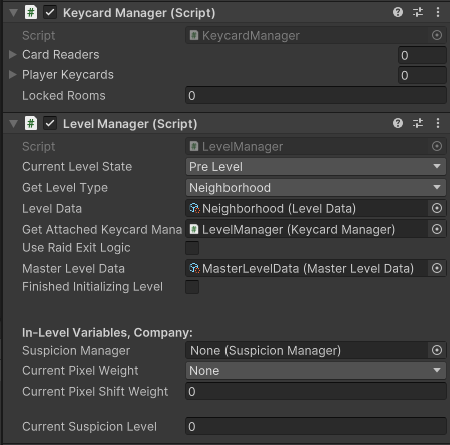
Two details matter here:
- The scene can declare what stage it is currently in.
- The actual level configuration is driven by an attached
LevelDataasset rather than by burying everything directly in the MonoBehaviour.
There are also some holdovers here, like KeycardManager and SuspicionManager. Those were technical-debt remnants from the first iteration. They were left in because removing them midstream caused more problems than keeping them parked for later cleanup.
Level Lifecycle
Levels were meant to move through three explicit stages:
Pre-LevelDuring LevelPost-Level
The point of that split was not ceremony. It was to separate:
- setup and dependency application
- active gameplay state
- wrap-up, extraction, or outcome handling
graph TD
    A[Select Venue from Map] --> B[Load Scene]
    B --> C[Pre-Level]
    C --> D[Apply LevelData]
    D --> E[Finished Initializing Level]
    E --> F[During Level]
    F --> G{Exit or Resolution Trigger}
    G --> H[Post-Level]
    H --> I[Return Results to Hub or Next State]
Pre-Level
Pre-Level is where the manager reads the selected LevelData and applies its requirements to the scene and to dependent systems.
Examples:
- whether the level is a company level
- whether raid-exit logic applies
- whether the bot/drone is required
- what control mode the level uses
- what collectables should be available
- what suspicion bounds the level allows
When the initialization work is complete, Finished Initializing Level flips and the scene can move into active play.
During Level
During Level is the live play state.
This is where the runtime rules from LevelData matter:
- control scheme in use
- whether the player is in a normal mixed-control level or a drone-only level
- whether the raid timer / forced exit logic is active
- what thematic pixel-shift or collectable behavior is allowed
- what the current suspicion gain looks like during play
Post-Level
Post-Level is the cleanup and resolution stage.
At this point the level can hand off:
- suspicion gain
- collectable results
- extraction outcome
- end-of-run or end-of-venue consequences
That split made the level flow easier to reason about than one giant always-on scene script.
LevelData ScriptableObject
LevelData is where the important level configuration lives.
That is the more important design choice here: level behavior is mostly data-driven.
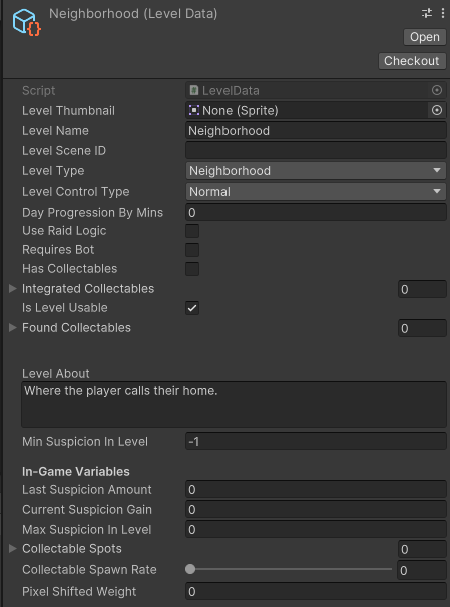
Important fields included:
Level NameLevel Scene IDLevel TypeLevel Control TypeDay Progression By MinsUse Raid LogicRequires BotHas CollectablesIntegrated CollectablesIs Level UsableLevel AboutMin Suspicion In LevelCurrent Suspicion GainMax Suspicion In Level- collectable spawn rate
- pixel-shifted weight
This made it possible for a designer to describe a venue without rewriting scene logic every time.
What LevelData Actually Controlled
At the design level, LevelData was meant to answer questions like:
- Is this a corporate/infiltration level?
- Does the player have a limited window before they have to leave?
- Is the drone required?
- Is this a drone-only level?
- Does the level allow collectables, and if so which ones?
- How suspicious can the player become here?
- How friendly or hostile is the venue by default?
- Does time progression matter in this space?
That last point is worth keeping narrow: this page is not about the separate TimeManager system. It is only about the fact that LevelData had fields prepared to communicate time-related behavior into the scene.
Control Types and Raid Logic
Two of the most useful pieces of LevelData were:
Level Control TypeUse Raid Exit Logic
Level Control Type determined whether the player was in:
- a normal level, where the human player is primary and the drone can also be used
- a drone-only level, where drone interaction is the dominant or only intended control mode
Use Raid Exit Logic controlled the extraction-pressure behavior. If enabled on a company level, the player had a limited amount of time to complete the goal and leave before the exit closed.
That gave the same general scene-management layer enough flexibility to support very different mission feels.
Suspicion, Collectables, and Technical Debt
The suspicion-related fields in the manager and in LevelData reflect a larger intended system that was later cut or reduced because of complexity.
The important part for portfolio purposes is not that the suspicion system fully shipped. It did not. The important part is that the level architecture had already been built to support:
- venue-specific suspicion bounds
- current gain tracking
- friendly/neutral/suspicious ranges
- collectable spawn behavior
- pixel-shifted object weighting
That shows the groundwork was being laid for systemic level-state variation, even where the later implementation was trimmed back.
Map System Dependency
The map system depended on LevelData to display and select venues.
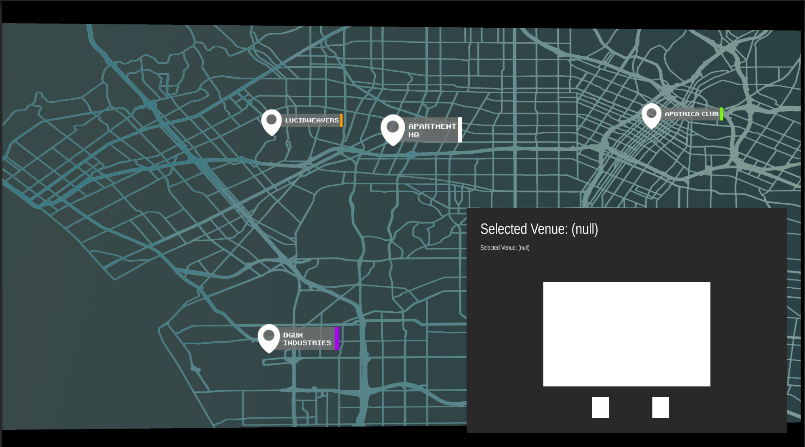
That dependency mattered because it made level selection modular:
- the map can surface available venues
- the selected venue can read from its
LevelData - thumbnails, labels, and availability can all come from the same asset
- traversal becomes scalable instead of being hard-coded one scene at a time
So the map was not just cosmetic. It was part of the level-selection and runtime configuration pipeline.
Why This System Mattered
The LevelManager and LevelData pairing was one of the cleaner architecture decisions in this branch of the project.
It gave the prototype:
- scene-specific control without global hard-coding
- a data-driven venue layer
- explicit setup/play/cleanup stages
- room for different control types and extraction rules
- a clean bridge between map selection and runtime level behavior
That is also why this page is worth keeping separate from the heavier groundwork documentation. The useful portfolio point here is not generic “manager” complexity. It is the actual level architecture: one scene manager per level, one ScriptableObject per venue, and a modular path from selection to initialization to active play.