Things I Wish My Coding Teachers Taught Me
Most of the Python work I’ve done on projects like ERIS and Noesis was AI-engineered, with me acting as the director. Back in 2021, I could maybe do four Leetcode “easies.” It’s only now, in 2026, while doing C for Harvard’s CS50 as a refresher, that programming is actually starting to click.
Looking back at my early experiences with programming classes in high school, a few things really stand out. My teacher had a background at AT&T, but his teaching style was essentially: “Here are some resources, figure it out yourself.” It was a DIY approach that completely missed teaching the “why” and the “how.”
Even polished courses like CS50 sometimes fall into this trap. They assume you’ll absorb the underlying mental models just by doing the exercises, but that completely fails for people who need the why before the how clicks.
The Mario Pyramid and ASCII Frustration
One of the most vivid examples of this was the CS50 “Mario Less” exercise, which asks you to build the right side of a pyramid using ASCII bricks. Because the underlying spatial logic and coordinate systems weren’t explained, I ended up brute-forcing it.
I filled four pieces of paper with handwritten code just to get a damn ASCII pyramid to look right.
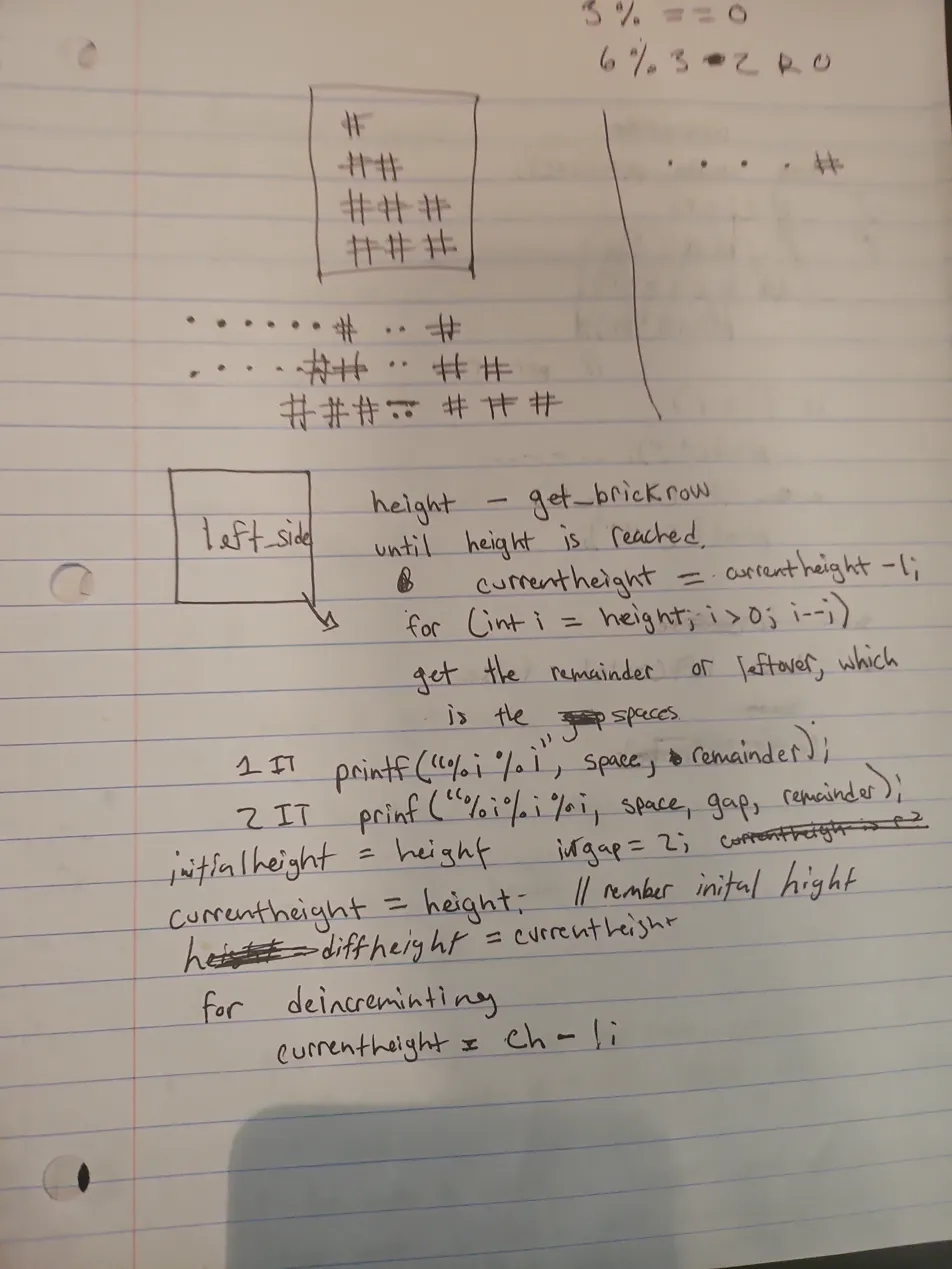
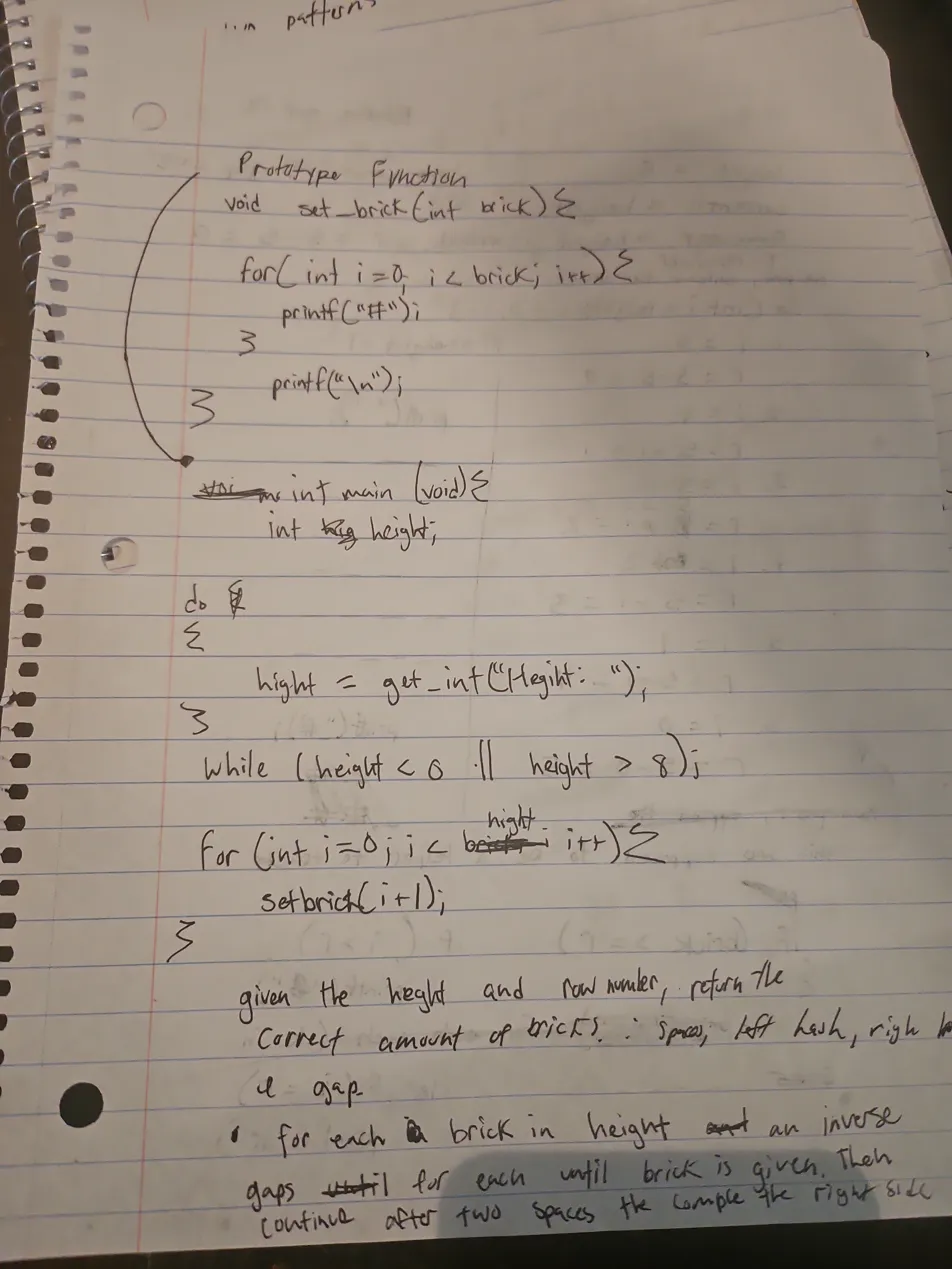 *(Note: The `set_brick` helper function shown above wasn't mine; I pulled it from a lecture guide. But the instinct to separate concerns was there!)*
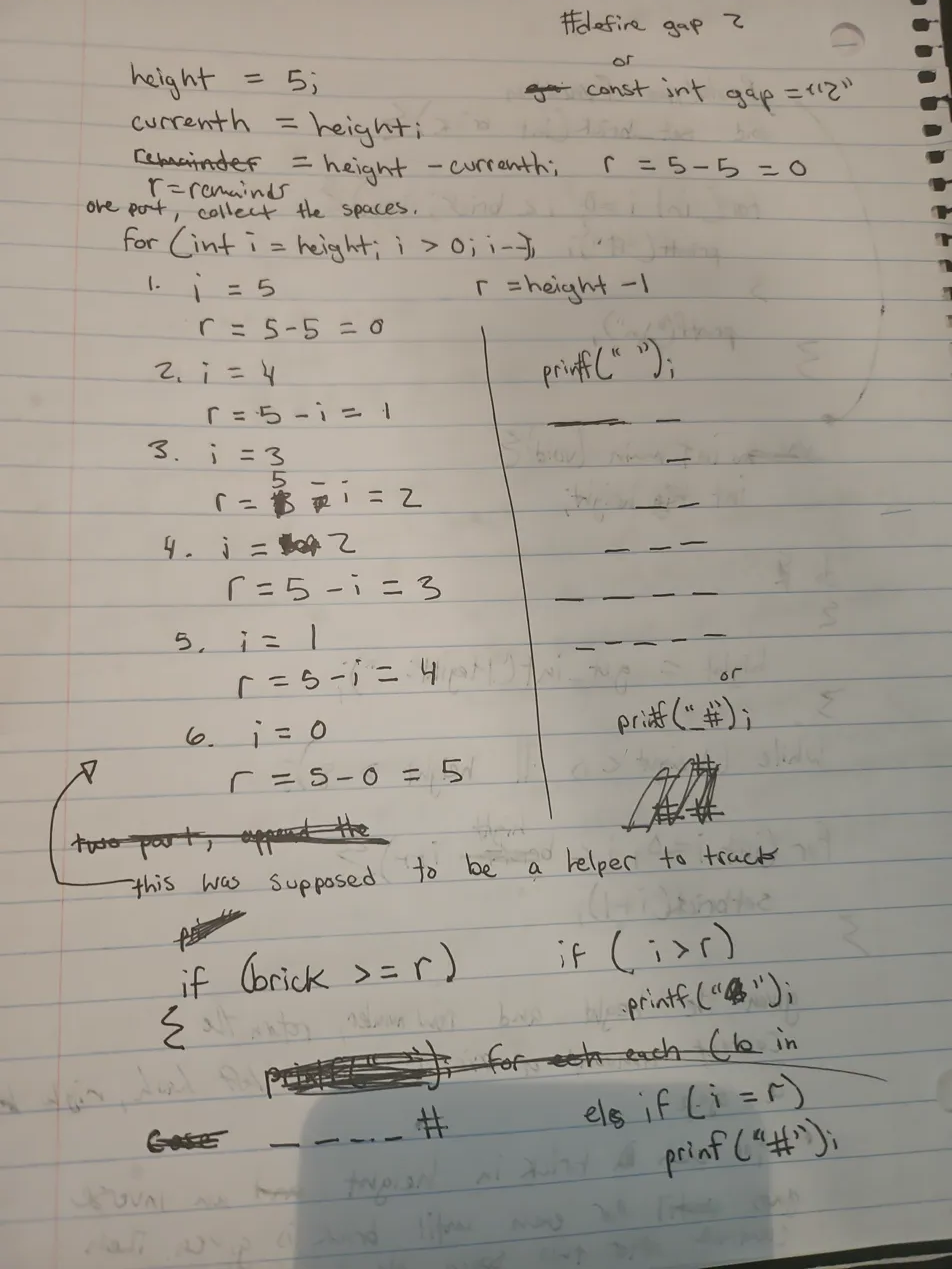
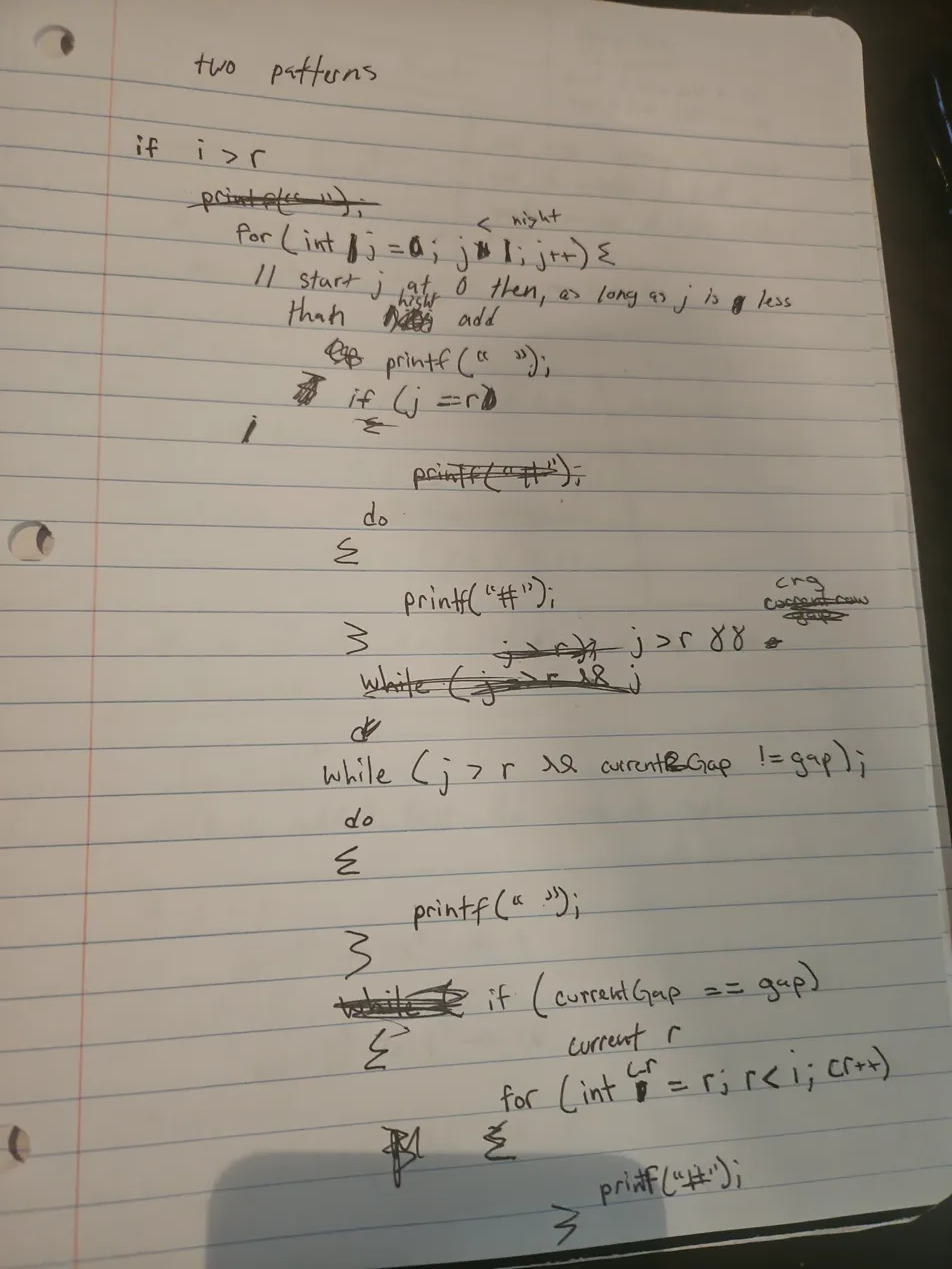
For that final page, I stopped and painstakingly charted the logic line-by-line on paper before even attempting to test and debug it in the CS50 IDE. Simple tables are great for tracking number flow, but to build this, I had to expand my mental model beyond a table to trace the spatial execution (which later led to me tracking simple math line-by-line, as I’ll get to later).
The funny part? I was massively overcomplicating it. In my IDE drafts, I was trying to manually track a currentHeight variable through nested loops. The final, working code ended up being much less code than those four handwritten pages. All I really needed was the top for loop, a set_brick(i + 1) call, some spaces based on height - i - 1, and a newline.
[!NOTE] The Syntax vs. Structure Trap After those handwritten pages, getting a pass from the
check50autograder actually took three distinct prototypes. My initial implementations in C were structurally correct, but completely failed the strict string constraints.My first prototype successfully printed spaces and the left pyramid, but broke because of execution order. I originally put the newline
\ninside myset_brickhelper function, and printed the gap spaces at the bottom of the loop (so the gap printed on the next line instead of the middle).My second prototype was where debugging started to involve guessing. The loop structure was entirely different from the final version, using manual loop decrements and calling
set_brick(i)(which still had a newline\nbaked inside it) before the inner loop:for (int i = 0; i <= height; i++) { set_brick(i); // This printed the right pyramid AND a newline for (int j = height; j >= 0; j--) { // ... if/else logic for the left side ... } }I was geometrically forced to put
set_brickbefore the inner loop, because putting it after caused its baked-in newline to stagger the right pyramid downward into a broken staircase:# ## # ### ## #### ### ##### ####But because the newline now fired early, the console output literally intertwined the next row’s right side with the current row’s left side. While swapping
,#, and operator signs (like<versus<=) in myif/else iflogic to figure out exactly what controlled what boundary, I generated bizarre geometric glitches. It felt like physically sculpting shape topologies using loops.For example, leaving
j > ias#generated an inverted left pyramid clashing into a normal one, but changing just one inner bounds condition from<to==actively warped the angle of the gap between them:#### # ### ## ## ### # ####Versus pulling the gap completely open diagonally:
#### # ### ## ## ### # ####Setting all conditions to
#created a solid square block crushing against the pyramid:##### # ##### ## ##### ### ##### #### #####And hollowing out the middle boundary
j == icarved a perfect empty diagonal trench right through the block:#### # ### # ## ## ## ### # ### #### ####To figure out why my spatial logic was building these bizarre artifacts instead of what I pictured in my head, I injected raw state-tracking print statements directly into the loops:
// Trying to map spatial logic with printouts
for (int j = height; j >= 0; j--) {
    printf("currentHeight is %i, j is %i, i is %i.\n", currentHeight, j, i);
}
Looking at that manual print log is ultimately what snapped me out of shapes and into loops. At the very bottom of the log, the output broke out of bounds:
#currentHeight is -1, j is 3, i is 4.
#currentHeight is -1, j is 2, i is 4.
#currentHeight is -1, j is 1, i is 4.
#currentHeight is -1, j is 0, i is 4.
Because my
ibounds droppedcurrentHeightinto negative numbers, it proved the core issue wasn’t the physical structure of the shape—it was a mathematical offset misalignment. Once I adjusted the offset variables to prevent that-1bleed-over, the output was finally structurally correct, but still missing the final newline:# # ## ## ### ### #### #### #### mario-more $The third (working) prototype required changes that frankly couldn’t be derived purely from first principles. I was staring at output that looked structurally perfect in the terminal (even though it lacked a trailing newline, causing the shell prompt to overlap the last row like
#### mario-more $), butcheck50kept failing it. I got so frustrated that I legitimately had to have the final answer told to me because the debugging had devolved into blind guessing.The correct structure—specifically calculating the whitespace gap mathematically with
(height - i - 1)rather than using spatialif/elsebounds—was painfully non-obvious. At most, I would have tried tacking a+ 1onto my old logic and continued guessing. Making that mathematical leap alongside pulling theset_brick(i + 1)and\ncommands completely out of the inner loop to run linearly just didn’t map to the physical topography of the problem.for (int j = 0; j < height - i - 1; j++) { printf(" "); } set_brick(i + 1); printf(" "); set_brick(i + 1); printf("\n");When it was finally right, the trailing newline was respected and the output cleanly separated from the shell:
mario-more/ $ ./mario
Height: 4
   #  #
  ##  ##
 ###  ###
####  ####
mario-more/ $
The delta between my very first implementation and the final version wasn’t a logic failure; it was print-sequence and offset guessing. My brain knew the spatial structure was right all along, but you can’t “math” your way into guessing the arbitrary index shifts the system demands.
But here is the core issue I discovered: there is no good spatial way to map the math to the printed shape.
A mathematical formula like height - i - 1 doesn’t intuitively tell you that one row will be omitted to leave an extra layer of bricks. Neither does it tell you whether the pyramid is going to build outwards to the left or outwards to the right. Because the math doesn’t visually translate to spatial direction without running it, the whole process had to be blindly guessed and debugged.
This exact disconnect is why I quickly ditched using flowcharts and visual programming paradigms like Scratch. I initially thought visual programming would map directly to how I see things in my mind—but it didn’t at all.
When you visualize a ball moving to the right, there are basically two mental modes to do it:
- Chronological: You imagine actually watching it move, or you imagine your hand physically pushing it in choppy, sequential steps.
- Displacement: You visualize the ball as a displaced shape that organically increments rightward based on tension or concentration. Instead of a discrete object being pushed, it’s a phase shift in a field. It might leave geometric trails (
o..o...o), which I sometimes use as a spatial verification crutch—physically ensuring a 5 is a shape of 5—even if I already instantly know the value of the number itself.
Flowcharts force you into the first mode (chronological, Box A pushes to Box B). But debugging that Mario pyramid by swapping those if/else if operators leaned entirely into the second mode: I wasn’t assigning sequential steps; I was tweaking the tension of a topological field and watching the displaced shape warp. It was a great testing method, but navigating purely by displacement still lacked the intrinsic “why” of the logic—which is exactly why I had to abandon the shape-sculpting and start printing raw currentHeight evaluation logs to finally bridge the gap.
This is exactly why I hated ASCII. It felt like fighting the medium. But looking back, those four pages weren’t a failure—they were me working through the spatial logic manually because nobody had explained the coordinate system. In math class, (0,0) is at the bottom-left. In programming, it starts at the top-left. It sounds small, but when you’re already struggling to visualize how your code translates to the screen, that inversion is a massive mental hurdle. I was tracking r values row by row, drawing the pyramid, and working out the remainder relationship for spaces—all because I was doing the right thing without the right map.
The Zero-Index and Empty Space Mental Model
This failure to explain spatial relationships maps directly to another huge stumbling block: 0-indexing and the endless plague of “off-by-one” errors.
Fun fact: even in grade school, I personally always started counting at 0 (perhaps an ADHD quirk or just my own philosophy), so the concept of starting at 0 wasn’t completely alien. But for most people who are taught to count objects starting at 1, it’s confusing. In programming, a coordinate system or an array in memory isn’t about counting objects—it’s about distance from the origin.
If you have an array of animals where “dog” is the first item, animals[0] is “dog”, and the next is “cat”. If you want to find “bird”, you write a loop like if (animals[i] == "bird") { printf("squawk"); }.
The first one is 0 because an index isn’t a label; it’s a measure of displacement. Just like measuring with a ruler, you don’t start at the “1 inch” mark—you start at “0” because you haven’t gone anywhere yet. Moving to the 1-inch mark is 1 jump (a displacement of 1).
When it comes to coding, though, you have several spatial hurdles compounding all at once to confuse you:
- Empty Space: Everything exists in an empty void. There is nothing there initially.
- Top-Left Origin:
(0,0)is at the top-left. So if you open a window and go fullscreen, you are technically dragging it from the top-left down to the bottom-right. - Loop Geometry: A single loop creates a row. But there is no column until you nest another loop.
If nobody explains this compounding geometry to you—that you are building dimensional axes out of empty space, starting from the top-left, using displacement rather than counting—you will endlessly suffer from off-by-one errors because your entire spatial anchor is shifted.
The Dimensionality of Loops
Another thing that isn’t explicitly taught is computational complexity intuition. No one stops to explain that if you have a loop and then add another loop, you are increasing the dimensionality per depth.
I ended up independently deriving this on grid paper. I realized that a single loop is 1D (a line of parallel operations), a nested loop creates a 2D manifold, and the actual grid geometry sits at “2.5D”—a partial (not even half) representation that essentially exists suspended in empty space.
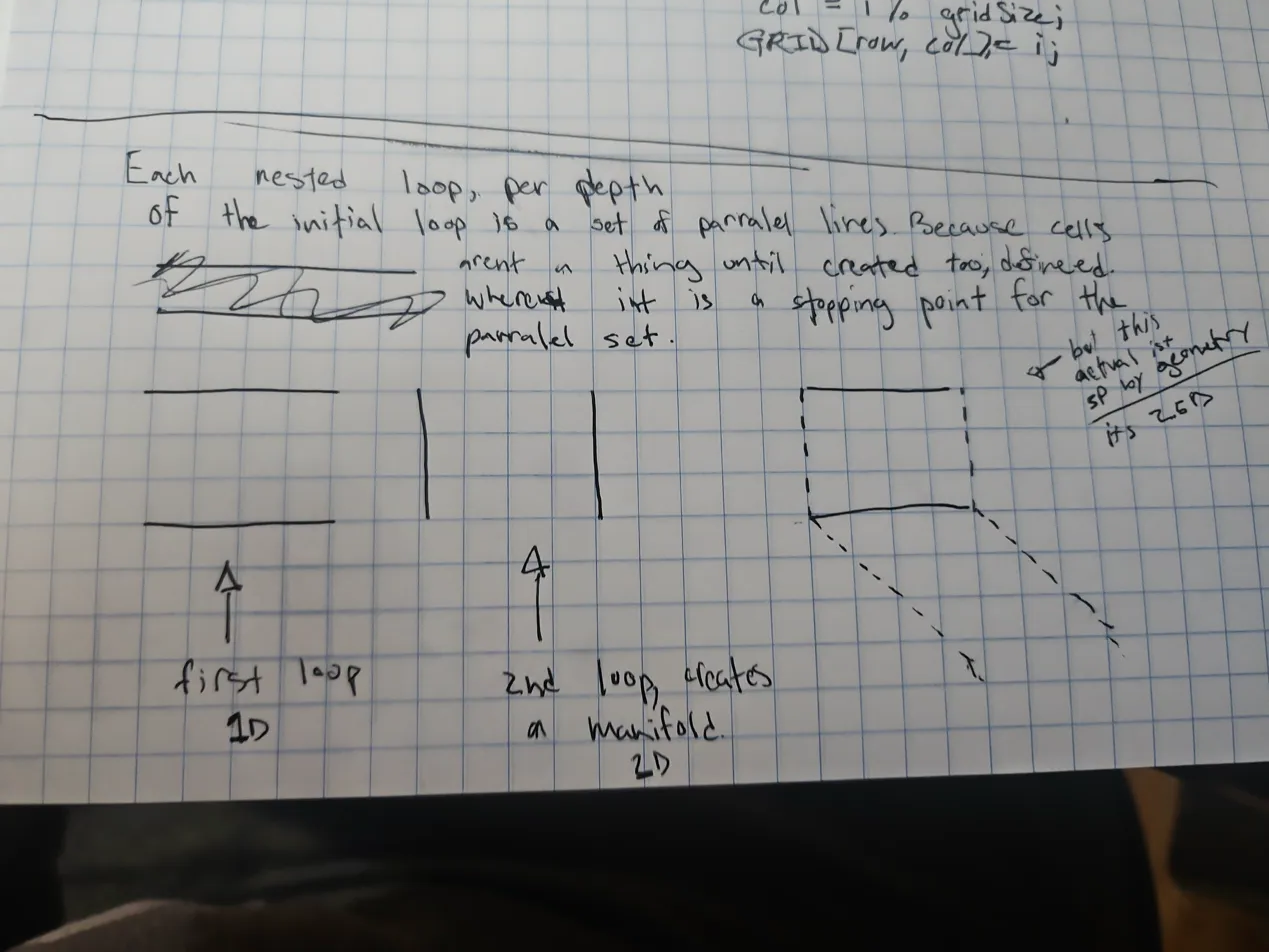
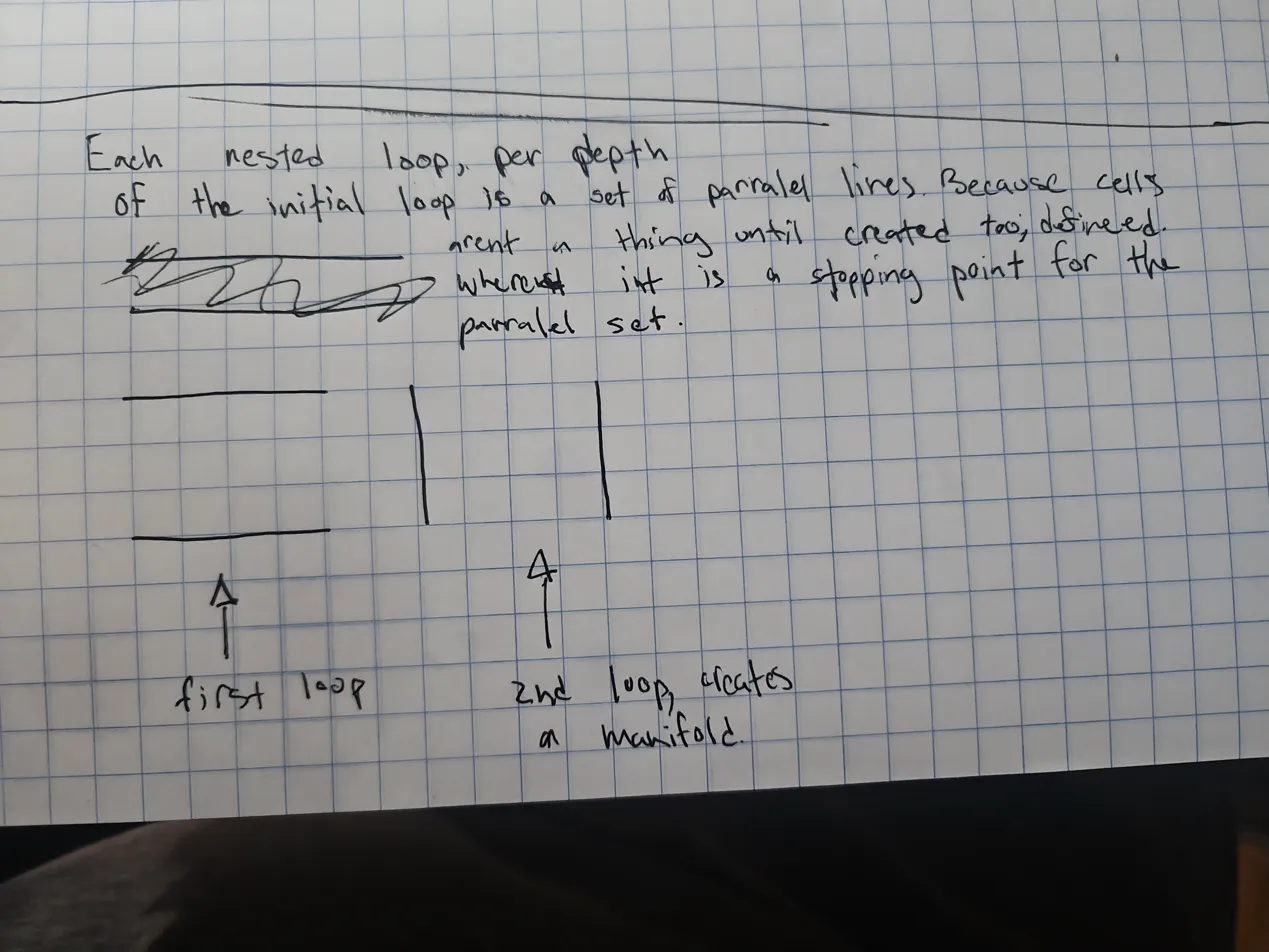
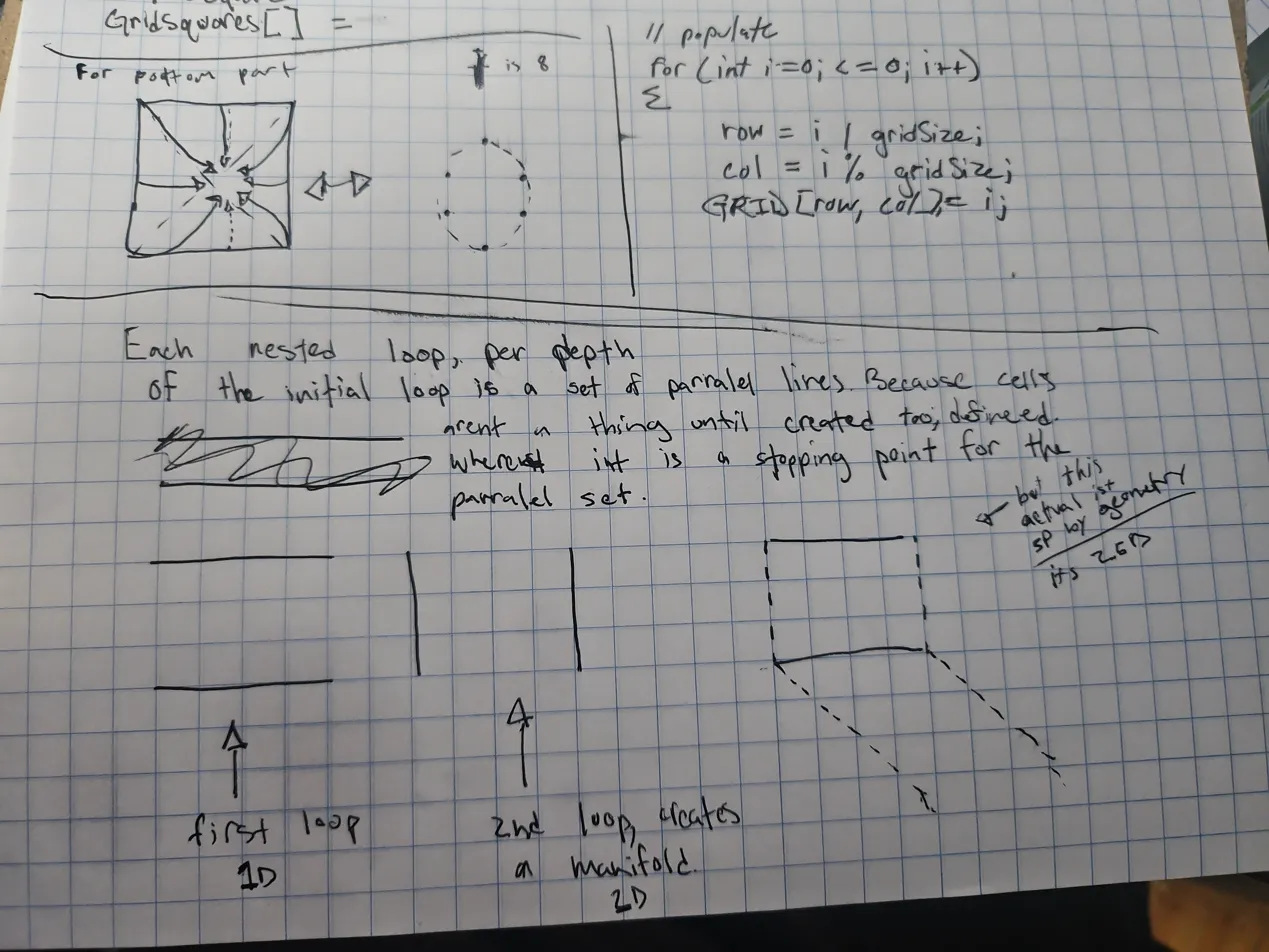 *(Note: The boxed notes and lower half are my independent mathematical derivations.)*
Fun fact: I actually derived that game engine intuition directly from the sketch at the bottom of that last page. I was thinking about the axes and realized, “Hold up, that means…” I took six edge points from a flat 2D plane and drew arrows showing how they could fold inward to imply the outer boundary of a sphere. I realized it wouldn’t create a solid “3D circle,” just a hollow shell. (I also realized later that using 8 points—including the top and bottom I had missed—would make a much better circle).
This “2.5D” realization clicked perfectly with how game engines work. My intuition was that game engines are inherently 2.5D, even when rendering 3D worlds, and that they fake 3D by placing incredibly detailed textures onto a 2D surface.
And mathematically, that intuition is entirely correct. Under the hood, game engines calculate in true 3D space, but the objects they render are practically never solid physical masses. According to standard computer graphics architecture, they use Boundary Representation (B-rep) [1]. This means that a 3D “sphere” on screen is actually just a hollow 2D shell (a 2D manifold of flat triangles) suspended in empty 3D coordinate space. Furthermore, all that rich, volumetric depth you see on surfaces is faked using computational tricks like Normal Mapping or Parallax Mapping [2]—techniques that tell the lighting engine to cast shadows on a flat 2D plane as if it had 3D bumps and grooves.
The axes (x, y, z) generated by nested loops are just the representational scaffolding implying a shape.
[1] Foley, J. D., et al. “Computer Graphics: Principles and Practice.” (Standard definition of Boundary Representation in polygon mesh modeling). [2] Lengyel, E. “Mathematics for 3D Game Programming and Computer Graphics.” (Core textbook on normal and parallax mapping for simulated depth on 2D surfaces).
That instinct to push past the surface definition and notice the underlying computational structure of the curriculum is what finally made things click. It’s the same logic behind understanding why you can count digits by using / 10 (because of decimal base representation) or why counting exact change differs depending on integer versus float representation.
Why Visual Programming (Scratch) Missed the Mark
This is also exactly why visual programming tools like Scratch never clicked for me. One of the main tools we were pushed to use early on was Scratch, and I hated it. It just didn’t feel good to code in, and for the longest time, I couldn’t articulate why.
Now I realize that visual programming breaks my mental modeling by forcing an unnecessary translation step. In a standard text-based environment, my pipeline is direct:
Logic → Mental Model (with dynamics) → How it SHOULD work.
Scratch forces you to go:
Logic → Visual Block Representation → Logic → How it should work.
It adds a whole extra cognitive layer. Instead of focusing on the architecture, Scratch forces you to focus on the UI first: the visuals, how the puzzle pieces physically connect, the spacing on the canvas, and then finally the variables and the actual logic.
There’s something about snapping blocks together that abstracts away the systems in a way that feels restrictive rather than empowering. I wanted to understand the underlying structure, not manage a drag-and-drop interface that obscures it.
Real Logic vs. “Copied Syntax” Progress
A huge part of finally understanding programming was realizing the difference between genuinely building logic and just faking it by copying syntax. When I was working on string counting exercises, I had a moment where I successfully set up the logic to count specific characters, split them into buckets, and print the totals.
I made a tiny slip at the end—I accidentally forgot to print countD.
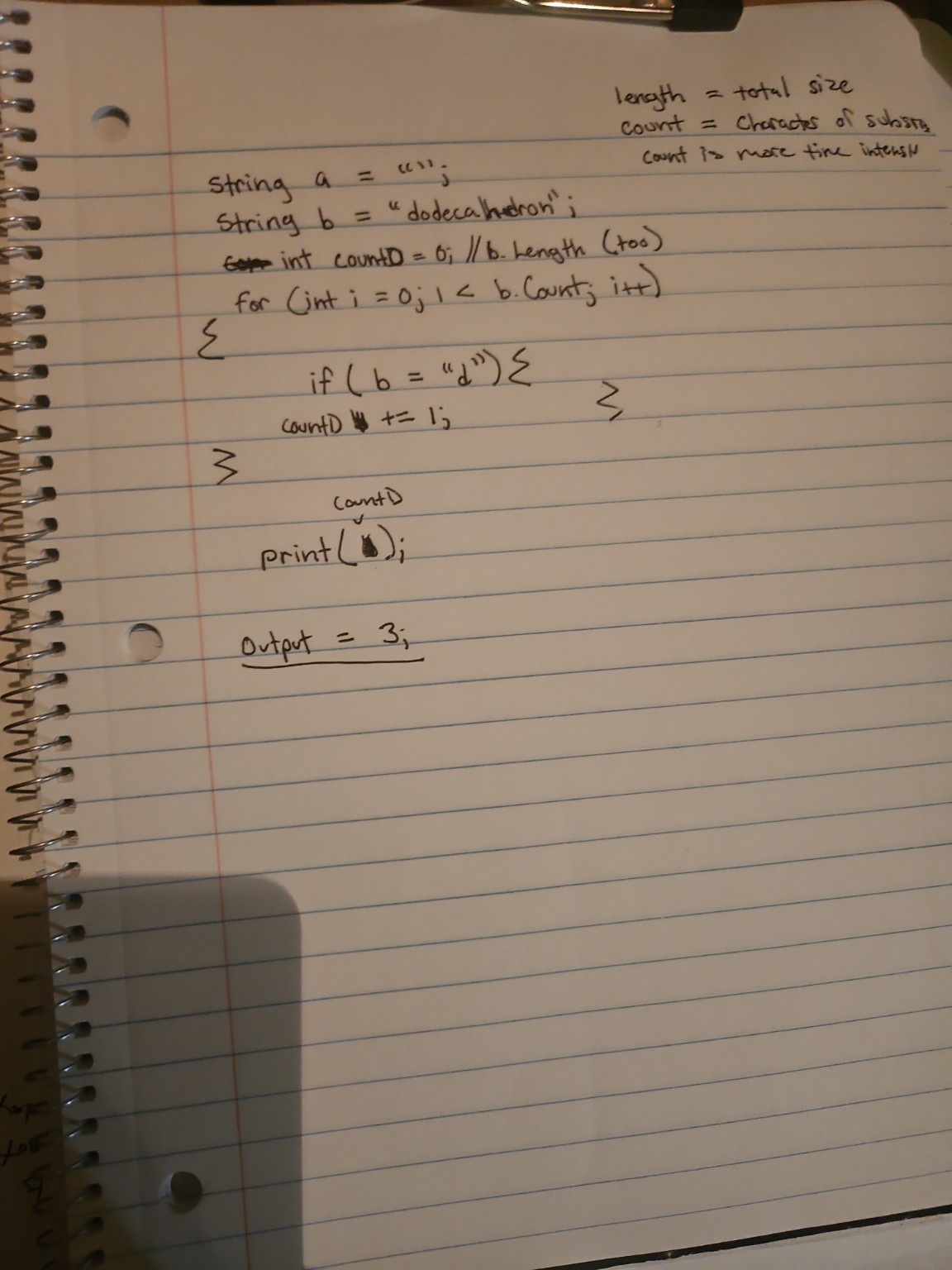
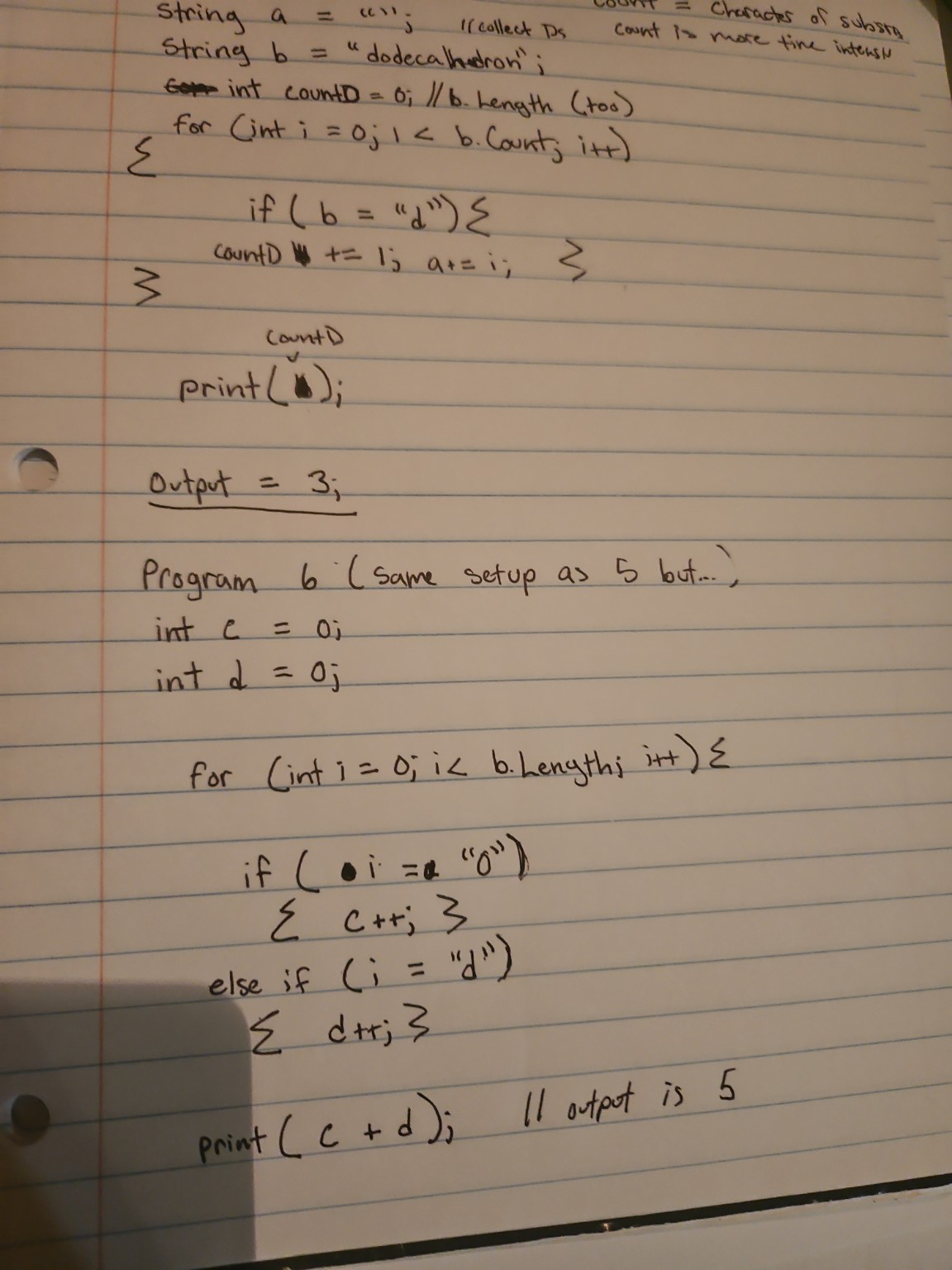
But because I actually understood the underlying structure, I knew it wasn’t a logic failure; it was just a final-use slip. For the first time, I wasn’t just copy-pasting syntax and praying it worked. I was actually building the logic. That kind of progress feels entirely different, and it only happens when you stop fighting the syntax and start understanding the models.
Even AI Can Miss the Point
This problem isn’t just limited to human teachers. Even when using AI to learn, it can fall into the exact same trap of prioritizing syntax over logic, or worse, completely misreading your working mental models.
While trying to build out the logic for a visual progress bar (#, ##, ###), I was experimenting with the idea of a pattern trigger. I conceptually sketched out using a modulo operation (i % 1 == 0) to say “for every single step, add a #.”
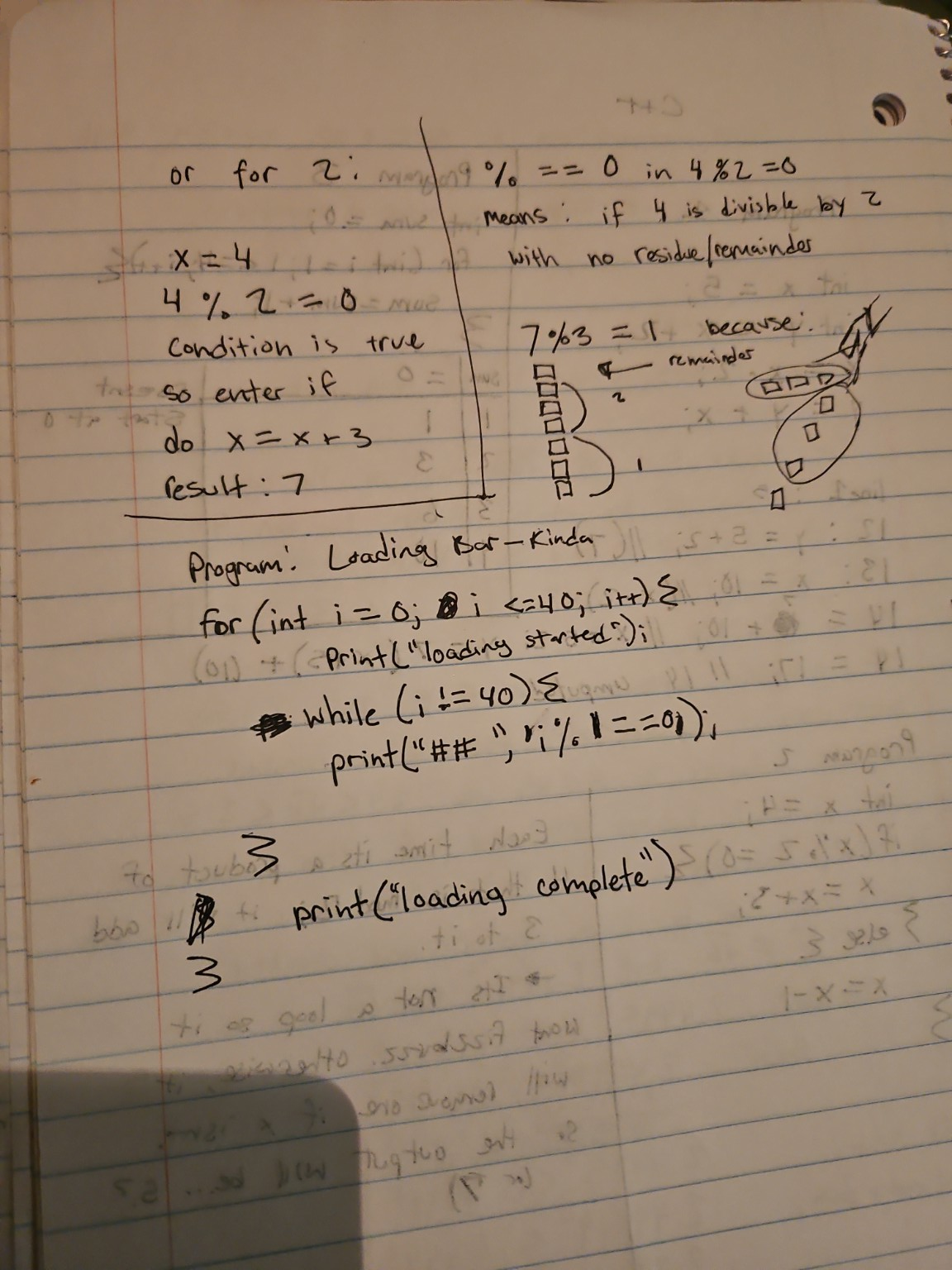
The syntax was crude, sure. But the underlying logic—using a divisibility check as a checkpoint rule for visible accumulation—was completely sound. Instead of recognizing what I was trying to build, the AI jumped in, assumed my core logic was wrong because the convention/syntax was weird, and just handed me the “correct” code (bar += "#").
It completely derailed my learning process. When you are trying to learn and write a specific, singular concept, having someone (or something) ruin it by showing you the final answer based on syntax assumptions is incredibly frustrating.
Assuming Intent and Giving Unwanted Answers
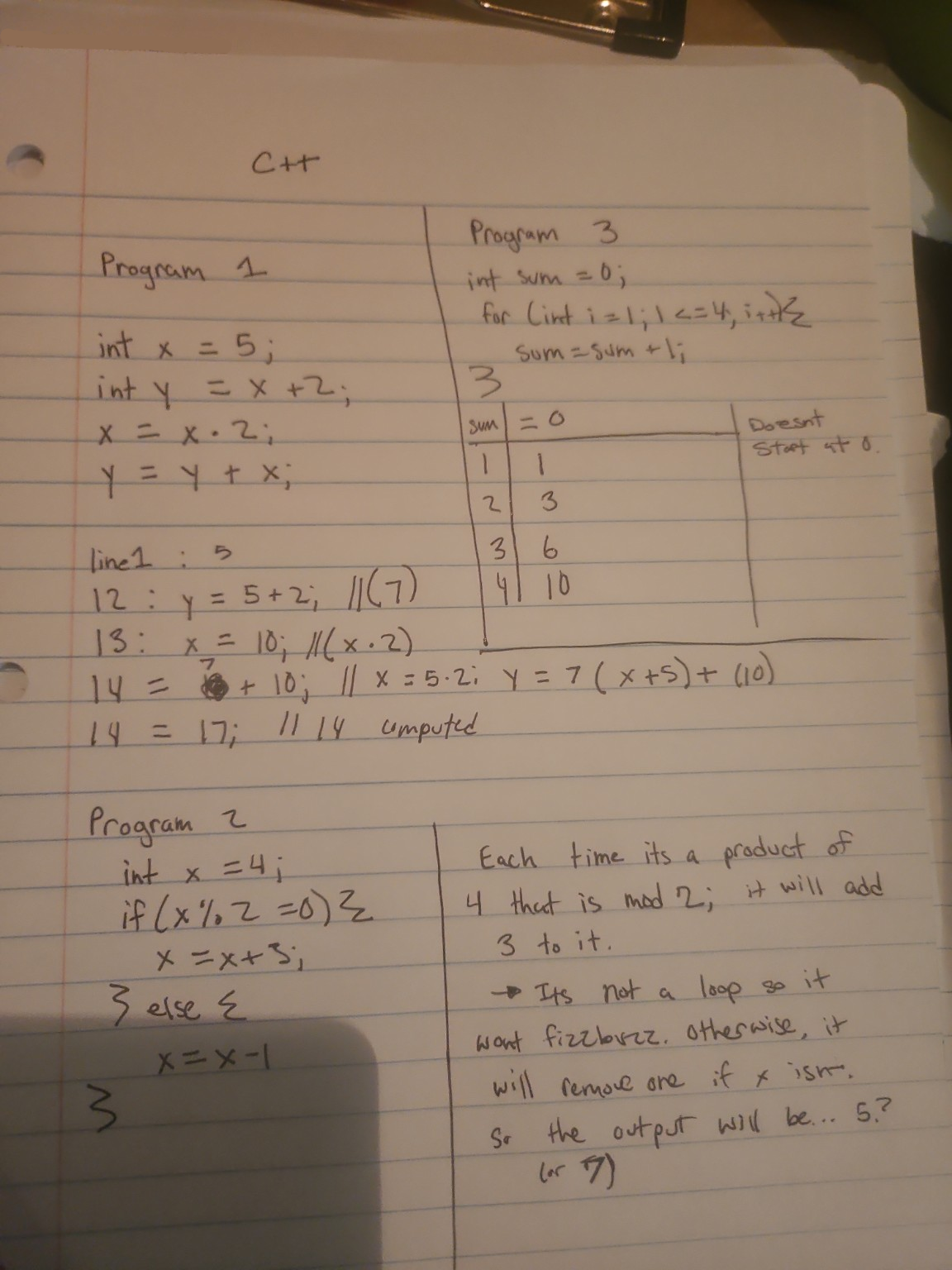
Before the progress bar incident, I was manually tracing the state of variables on paper for a few tiny C++ programs without an IDE.
For the first program, I made a transcription error—I accidentally read a 5 as a 3 multiple times while calculating down the page. I was so frustrated by this recurring slip that I genuinely asked the AI, “fuck do I have dyscalculia?”
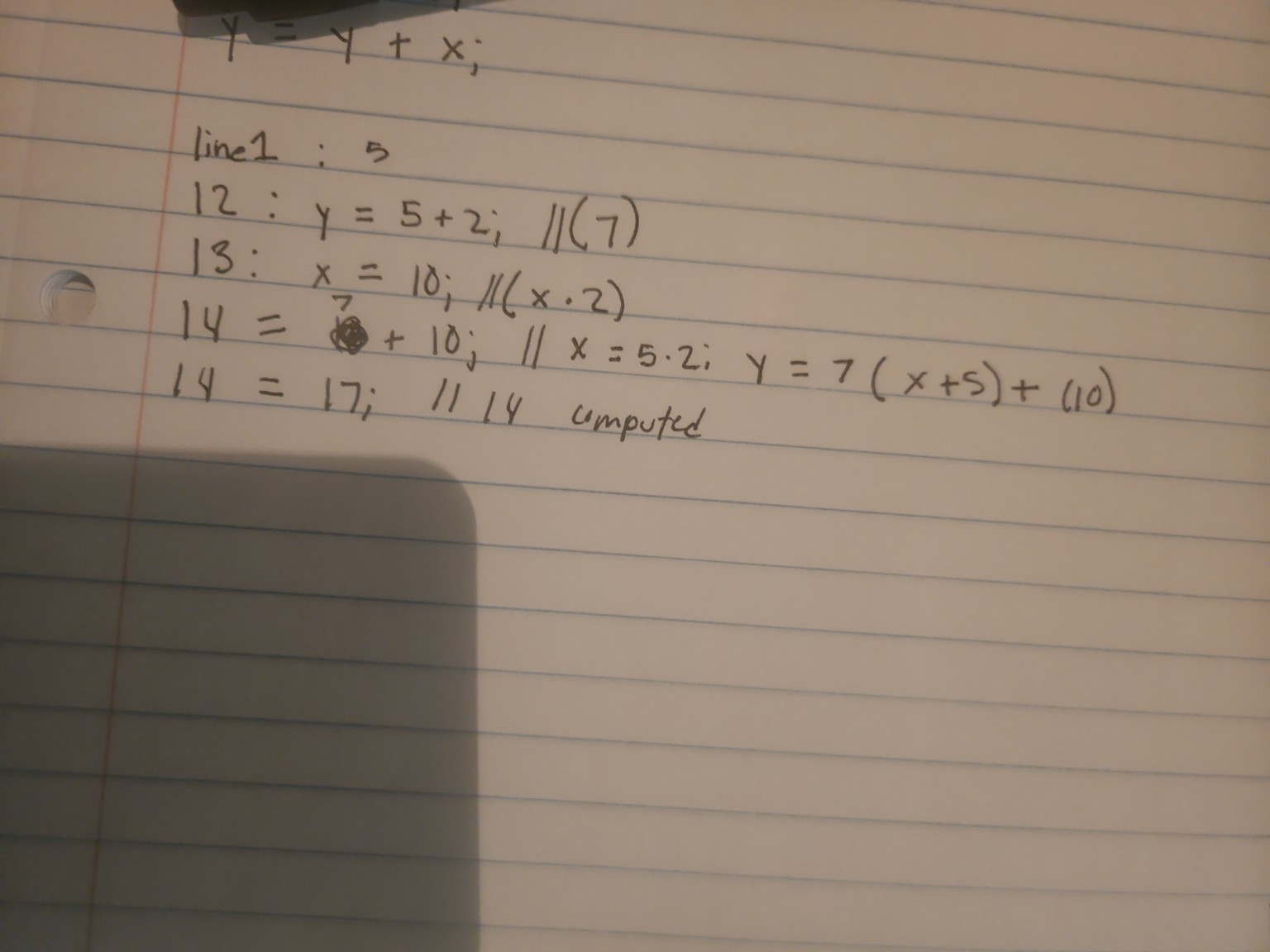
The AI answered my question objectively, analyzing signs of dyscalculia versus working memory overload. That part was fine. The real issue, and the broader problem with learning from AI, is what happened next: it kept assuming what I meant to do and jumping straight to the answer.
When I clarified that my underlying logic was actually sound and it was just a misread, it became clear how easily an AI (or a bad teacher) will derail your learning by assuming your core understanding is broken just because of a surface-level mistake.
This happened again with the third program. I had the loop’s execution perfectly mapped out in a table: sum = 0, i = 1 → sum = 1, i = 2 → sum = 3, i = 3 → sum = 6, i = 4 → sum = 10.
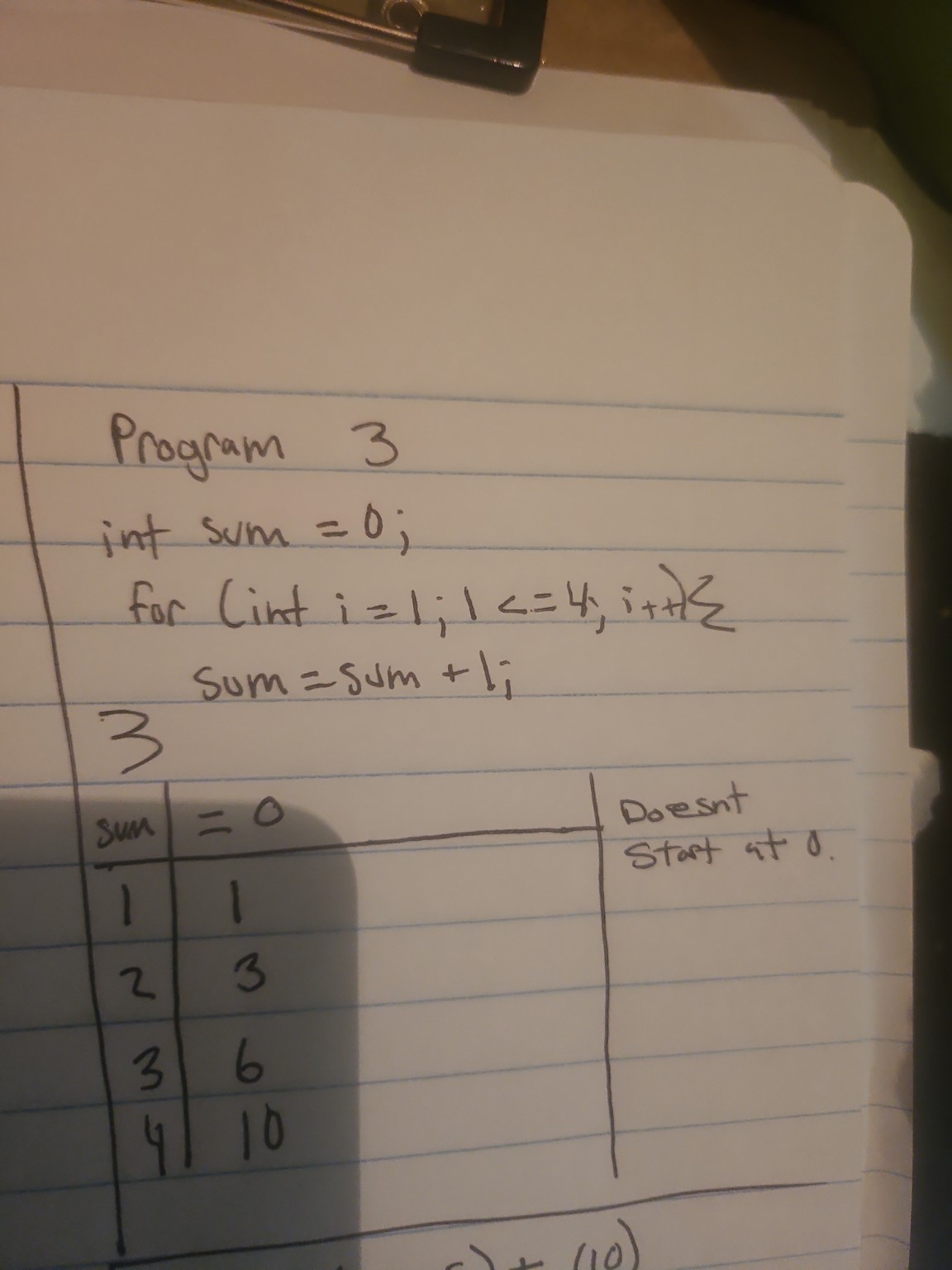
Instead of just looking at the table and validating my correct logic, the AI completely misread my photo and started explaining the program to me from scratch, assuming I didn’t understand how a loop worked. Once again, I had to explicitly correct the AI and point out that my table and logic were already right.
Even when it came to a simple modulo operation like 4 % 2 == 0 in the second program, the AI stated the remainder form so bluntly (“when 4 is divided by 2, the remainder is 0”) that it caused more confusion. My intuition was simply “is it divisible by 2?” which is entirely correct. Because the AI didn’t tie the strict mathematical definition back to my intuitive concept, it created an artificial stumbling block.
The most frustrating part of the whole experience was that I was explicitly trying to learn and write specific, singular concepts. But the AI would constantly ruin that process by jumping ahead, assuming my core logic was wrong, and just showing me the final answer. It takes a strong intuition to realize when a teacher (or an AI) is giving you the right answer to a question you didn’t ask, or explaining something in a way that actively fights your natural mental models.
What Actually Works (and the City of Control Flow)
If I could go back and design a curriculum for my younger self, it would focus heavily on:
- Core Concepts over Syntax: Understanding that loop nesting increases dimensionality.
- Mental Models: Explaining number base representation (the math behind
/ 10) and coordinate system conventions (0,0at the top-left) before asking students to build. - Debugging as a Skill: Teaching how to trace spatial logic systematically.
You can’t just throw links at someone or drop them into Scratch. You have to explain the underlying structure first: that a for loop incrementing isn’t just a count, it’s a dimensional displacement of rows. Each time you nest a loop, you add an axis. A single loop is a 1D line; a nested loop creates a 2D manifold. With enough nesting, the code literally becomes a dimensional object itself, displacing energy until it reaches the spatial stopping point of that higher-dimensional manifold governed by the total number of axes.
Once you have that map, you can build anything.
In 2014, when I wrote my SES scholarship application, I included this line:
“I have been interested in computing ever since I was a little tyke. I remember when I was that young, I’d held a motherboard and thought, ‘These look like mini-cities, the energy being the denizens of the place.’ … Ever since then, I have been meddling on computers and learning about the different quirks: software and hardware that comes with it.”
It’s funny to look back at that now from 2026. What I articulated as a kid holding a motherboard is exactly what I’m realizing now while fighting C syntax: code has a physical topology.
A complex program isn’t just a text document; it’s a series of nested buildings. Working through those subgrids on paper made me realize that arrays and loops have the exact same topological structure as printed circuits in flow. When you write control flow (if/else statements, loops, functions), you are literally doing city planning. You are building the streets and intersections, and the data (the energy/variables) are the denizens traveling through that city.
When you learn to program by copying syntax, you are memorizing the grammar of a language without knowing where the streets go. But when you finally understand the geometry of what you are building—when you map the circuit in your head before you write the code—everything changes. That is the only real way to build and debug systems, because you aren’t just fixing a typo anymore; you’re fixing a broken road in the city you designed.
And ultimately, that means computer science works precisely because it’s a field with dynamics that requires energy to move. Math is an expression of dynamics in physics, which is why it can model local things, and we can learn from it. Once you can see the field, you can direct the energy.